
When installing a new Windows, maybe you are going from one version to another.
And it cannot find the drive.
A media driver your computer needs is missing.
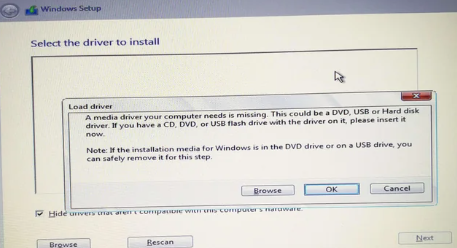
Possibly you need to either enable or disable Intel Rapid Storage Technology (RST or iRST).
Do this in BIOS.
Might be under Advanced.
Other:
Intel Rapid Storage Technology enabled in your BIOS = RAID mode (whatether a RAID is actually needed/created or not)
SATA Controller and/or PCIe SSDs mapped under VMD in your BIOS = Intel Rapid Storage Technology automatically enabled in your BIOS = RAID mode (whatether a RAID is actually needed/created or not).
Some info here:
https://www.elevenforum.com/t/enable-intel-rapid-storage-technology-in-bios.14205/
You might wonder why ASUS has enabled VMD by default, and what is the point of enabling VMD if not using RAID ?
Because VMD provides certain features usable even without using RAID, like error isolation from the Host OS, hot-plug and surprise removal support, standardized LED Management ... (hence the fact that Intel advises OEMs to enable VMD by default when VMD is present).